

Table of contents of the article:
Anyone who runs Varnish on a Joomla site expects response times to plummet. Often, the opposite happens: the server works as before, the database processes the same queries, and Varnish logs show almost nothing but MISSES and PASSES. The hasty conclusion is that "Varnish doesn't work with Joomla." In reality, Varnish works perfectly: it's Joomla, in its standard configuration, that prevents it from doing its job.
In this article I explain why this happens, how to solve it with a custom VCL configuration and what are the two traps that break the site if the cache is activated without criteria: logged in users and form security tokens.
The problem: a session cookie even for those who haven't logged in
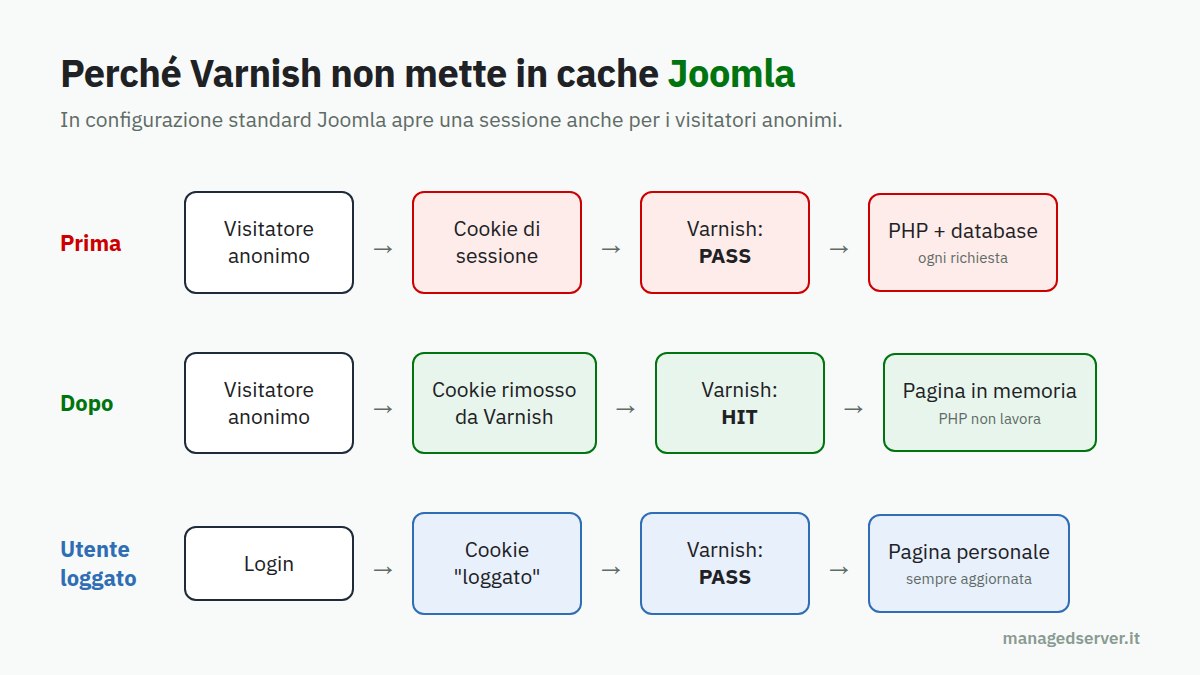
Varnish, to be on the safe side, doesn't cache requests that arrive with a cookie or responses that set one. This is a sensible choice: a cookie can identify a user, and a personal page should never be served to someone else.
Joomla, in its default configuration, starts a session for each visitor, even those who have never logged in, and sends the corresponding session cookie right from the first page. From that moment on, every request from that visitor carries the cookie. The result is that Varnish treats every anonymous visitor as a potentially personal user and sends everything to PHP. Caching is present, but it is almost never used.
There is a second detail that completes the picture: Joomla responds with headers that prohibit caching (Cache-Control: no-cache and an expiration date in the past). Even if you removed the cookie, Varnish would receive a response stating that it could not be retained.
How much is cache really worth?
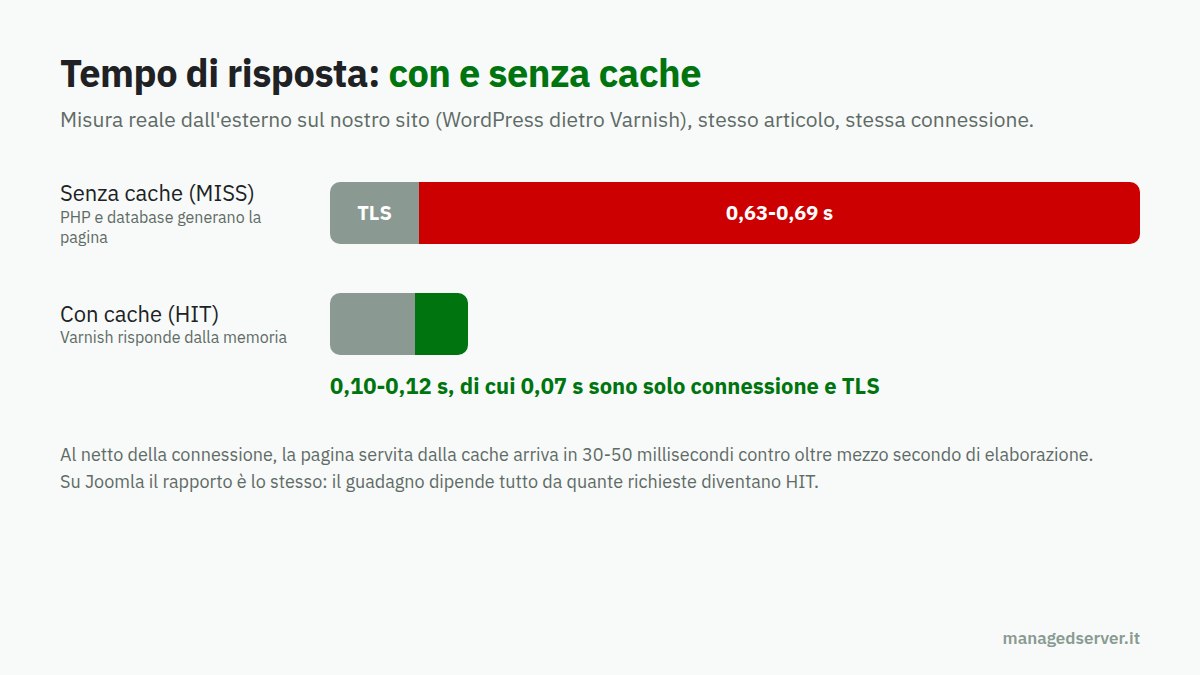
To give an idea of the scale, I externally measured our site, which is a WordPress site running Varnish, on the same page and over the same connection. Without caching, the page loads in 0,63-0,69 seconds; served by Varnish, it loads in 0,10-0,12 seconds, of which 0,07 are just the connection and TLS negotiation time from my workstation. Net of the network, that's 30-50 milliseconds versus over half a second of processing time.
On Joomla, the ratio is the same, often even more pronounced on sites with many modules and extensions. But the profit depends entirely on one thing: how many requests become hits. With the session cookie enabled for everyone, that percentage is close to zero.
The solution: three rules to follow
The correct strategy can be summed up in three rules:
- anonymous visitors receive pages from the cache, and for them Varnish ignores the session cookie;
- Authenticated users never go through the cache, because they see personal pages;
- the pages with forms, the administrative area, the login, the cart and the checkout are always excluded.
The problem is distinguishing an anonymous user from a logged-in user, since both have a session cookie with an indistinguishable name. Joomla doesn't provide a proxy indicator, so we create one ourselves: a small system plugin that sets a dedicated cookie upon login, for example: ms_loggato=1, and deletes it when you log out. Joomla 4 and 5 provide the right events (onUserAfterLogin e onUserLogout) and the plugin is written in a few lines. The plugin itself can send Cache-Control: private to authenticated users, so no intermediate cache stores their pages.
The VCL configuration
Here is a base for Varnish 6 or 7, to be adapted to the individual site:
vcl 4.1;

sub vcl_recv {
    # Solo GET e HEAD possono finire in cache
    if (req.method != "GET" && req.method != "HEAD") {
        return (pass);
    }

    # Area amministrativa, utenti, form e percorsi dinamici
    if (req.url ~ "^/administrator" ||
        req.url ~ "option=com_users" ||
        req.url ~ "[?&]task=" ||
        req.url ~ "^/(login|accedi|registrazione|carrello|checkout)") {
        return (pass);
    }

    # Utente autenticato o con "ricordami": niente cache
    if (req.http.Cookie ~ "ms_loggato=1" ||
        req.http.Cookie ~ "joomla_remember_me_") {
        return (pass);
    }

    # Parametri di tracciamento: non cambiano la pagina
    if (req.url ~ "[?&](utm_[a-z]+|gclid|fbclid|msclkid)=") {
        set req.url = regsuball(req.url, "(utm_[a-z]+|gclid|fbclid|msclkid)=[^&]*&?", "");
        set req.url = regsub(req.url, "[?&]+$", "");
    }

    # Visitatore anonimo: il cookie di sessione non serve
    unset req.http.Cookie;
    return (hash);
}

sub vcl_backend_response {
    if (bereq.uncacheable) {
        return (deliver);
    }
    # Joomla invia un cookie di sessione e "no-cache" anche agli ospiti
    unset beresp.http.Set-Cookie;
    unset beresp.http.Cache-Control;
    unset beresp.http.Expires;
    unset beresp.http.Pragma;
    set beresp.ttl = 10m;
    set beresp.grace = 6h;
    return (deliver);
}
Some notes on these rules. Excluded paths should be adapted to the site's actual menu aliases: if the login page is called /area-riservata, is the one that should be excluded. The cookie joomla_remember_me_ It is used to not "forget" users who have chosen to stay connected: without that rule, Varnish would remove the cookie and Joomla would not be able to recognize them. grace six hours allows Varnish to serve a newly expired copy while preparing a new one, preventing a traffic spike from hitting PHP all at once just as the cache expires.
The Security Token Trap
Joomla protects forms with a CSRF token: a code inserted into the HTML that must match the session of the person submitting the form. If a page containing a form is cached, all visitors receive the same token, which doesn't match any of their sessions. The result is the classic invalid token error when submitting.
The most common case is the login form displayed on all pages , perhaps in the sidebar or header. With caching enabled, it becomes unusable. There are two clean solutions: show the login form only on the login page, which is excluded from the cache, or replace it with a simple link to that page. The same goes for contact forms and any forms placed on public pages: either they live on excluded pages or are loaded separately.
Is Joomla Cache Still Needed?
Joomla has its own caching system: the system cache (conservative or progressive) and the "System – Page Cache" plugin, which stores entire pages for guest visitors. With Varnish in place, Joomla's page cache becomes largely redundant: Varnish responds before PHP even starts, so the entire pages stored by Joomla are rarely requested.
The conservative module cache , however, remains useful: it speeds up page generation when Varnish needs to query PHP, i.e., on MISS pages and for authenticated users. This is the combination we recommend: Varnish for entire pages, Joomla's conservative cache for fragments.
Refresh cache when publishing
Joomla doesn't have native integration with Varnish to clear modified pages. With a TTL of ten minutes, the problem is limited: a modified article appears updated within a few minutes. When immediate updates are needed, the same system plugin can intercept the saving of content (event onContentAfterSave) and ask Varnish to invalidate the article's page, its category, and its home page, with a request authorized only by the server itself. This way, you can extend the TTL and further increase the HIT rate.
How to check if it works
Three checks are enough:
- from anonymous visitor, reloading a page twice, the second response must come from Varnish (the header
Agebecomes greater than zero); - from logged in user, pages must show your own name and menu, never someone else's;
- the forms (login, contacts, registration) must work on the first submission, without token errors.
On a production site it is then worth looking at the ratio between HIT and MISS for a few days with varnishstat: This is the number that tells you whether the configuration is actually easing the load on the server.
Conclusions
Varnish and Joomla work very well together, as long as you understand their conflict: the session cookie assigned to everyone. By removing it from anonymous users, recognizing authenticated users with a dedicated cookie, and keeping forms and restricted areas out of the cache, you can go from an unused cache to response times of a few tens of milliseconds for the vast majority of visits.
If your Joomla site is slow or you've already tried Varnish without success, we can configure cache, plugins, and exclusions tailored to your site on our Joomla hosting , and with our Varnish Cache support service, we can also work on existing infrastructures.

