
Table of contents of the article:
There's a request we receive almost every week, with different words and always the same substance: "The site is slow, we need faster hosting" or "Enable caching for us, that will fix it." Behind it, almost always, is a beautiful website, with meticulous graphics, and a server response time of more than three or four seconds before the browser even starts rendering the page.
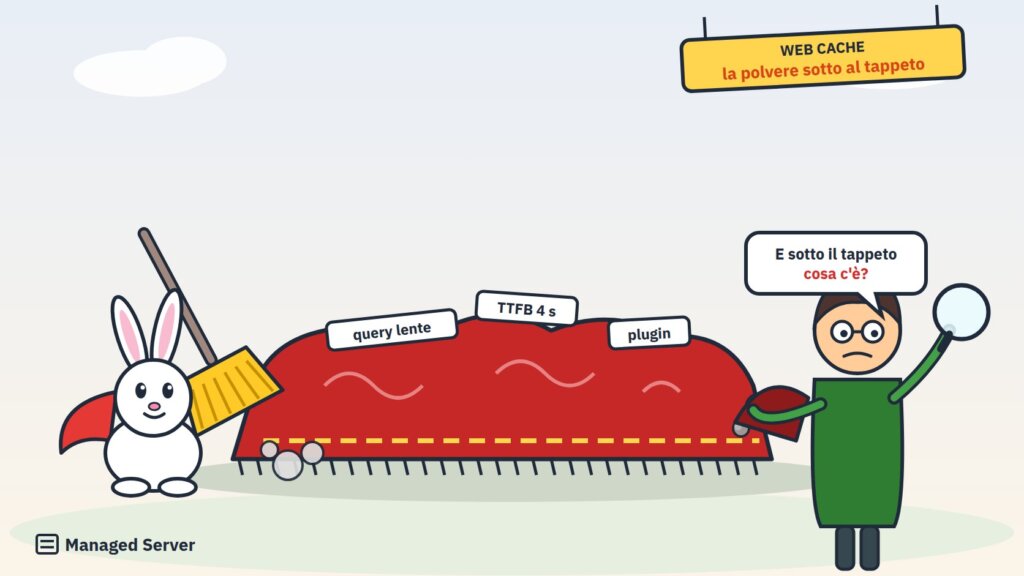
Customers are right to ask for a fast website. They're wrong, or rather, they've been led to believe something wrong, when they think speed can be achieved by changing hosting or enabling a cache. A web cache doesn't solve problems: it hides them, like dust under the rug. It works until someone lifts the rug. Then someone lifts it: a customer adds a product to their cart, a user logs in, a bot requests a page they've never seen before, an advertising campaign drives traffic to uncached pages. And the dust is still there.
In this article, I want to explain why this happens, why the responsibility is so often passed onto hosting, and what it really means to optimize an application, from the database to PHP, including profiling and bottleneck identification.
Beautiful sites, shameful performances
In recent years, building a website has become incredibly easy. A purchased theme, a page builder, twenty or so plugins to add features, and in a few days the site is up and running. It's a huge step forward, and I don't say this out of nostalgia. But this ease comes at a price that's rarely explained: every plugin, every module, every feature added with a click executes code and queries the database on every page , and almost no one knows how much it costs.
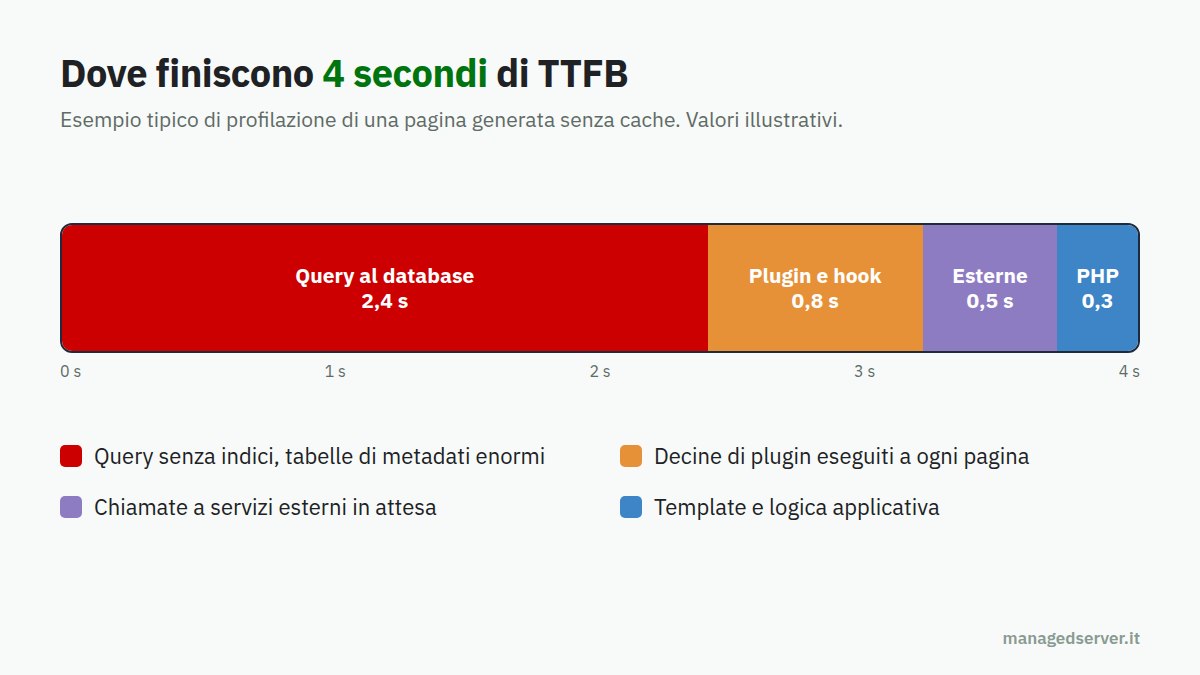
We see the result every day. Pages that run hundreds of database queries to display a list of products. Plugins that load unnecessary options on every request. Searches that scroll through entire tables with millions of rows because an index is missing. Calls to external services made during page generation, waiting for responses from distant servers. Each individual choice seems innocuous; when added together, they lead to TTFBs of four seconds or more.
The problem of the bases
I'm saying this frankly, because I've been working in this industry for many years, and I think it's necessary to say it: too often, those who present themselves as developers aren't . They're someone who knows how to install and configure plugins, who knows how to use a page builder, who knows how to make a website attractive. These are useful skills, but they're not software development.
Many of these professionals don't have an academic background in computer science, and often not even the technical training of the old ITIS (Technical Institute for Information Technology), where algorithms, data structures, databases, and systems were studied. It's not a question of qualifications to hang on the wall: I know excellent self-taught professionals who studied on their own, and seriously. It's a question of theoretical foundations . And when those foundations are missing, you can see exactly when something goes wrong.
Concepts that should be the daily bread of anyone who writes or assembles software are missing:
- the cost of each operationReading a row through an index is different from scrolling through an entire table, and the difference increases with the data. A function that works well with a hundred products becomes a disaster with a hundred thousand;
- good practices of a database: normalization where needed, correct data types, keys and constraints, tables that do not grow uncontrollably;
- the concept of slow query: knowing that it exists, how to detect it, why a query that takes two seconds to execute on every page will bring any server to its knees;
- the usefulness of indexes: what they are, when they are useful, when they cause harm, how the database decides whether to use them;
- the difference between work done once and work done on every request: calculations that could be saved but instead are repeated thousands of times a day.
Without this foundation, when your site slows down, you don't know where to start. You try one optimization plugin, then another, then you compress images, then you minify CSS. All of these things improve browser loading, but they don't address the real problem: the server taking four seconds to generate the page.
The shortcut: "Change hosting and enable caching."
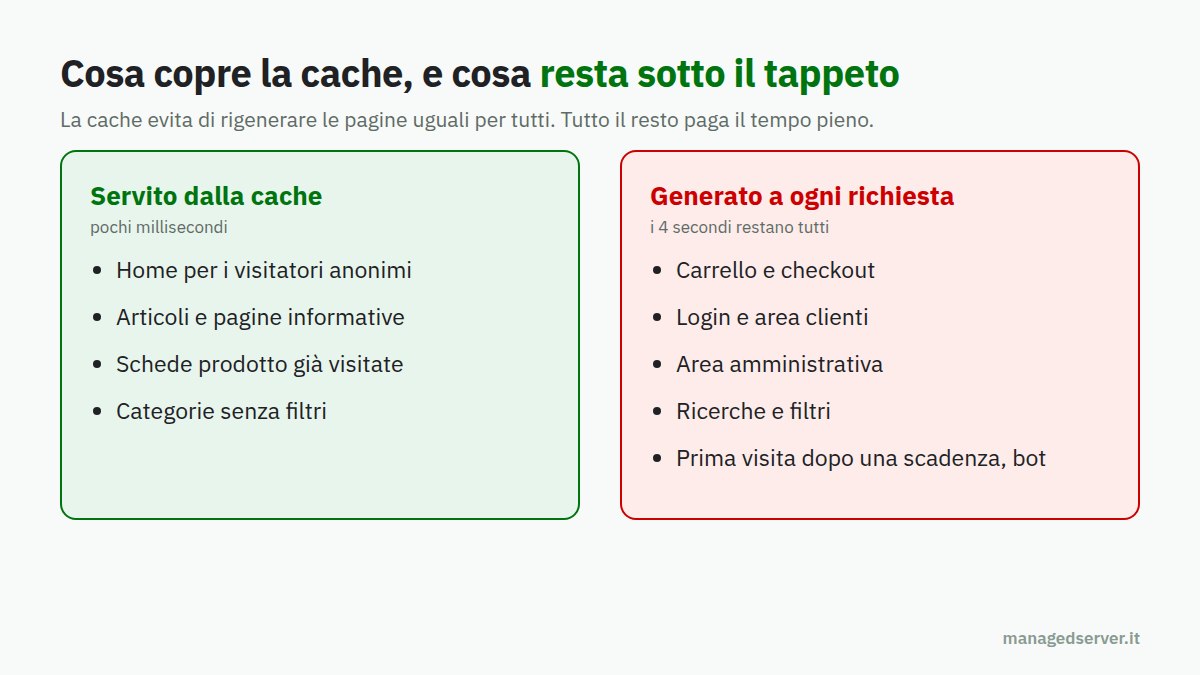
At this point, the customer, understandably tired, looks for the simplest solution. If the site is slow, it's the server's fault. They change hosting, choose a more expensive plan, and ask to enable caching. And indeed, for a while, something improves: the pages most frequently visited by anonymous visitors are served from the cache in a matter of milliseconds.
But a web cache keeps copies of already generated pages. It doesn't speed up page generation; it just avoids repeating it when possible. And there are many situations where it can't:
- authenticated users, who see personal pages and cannot receive someone else's copy;
- the cart and checkout of an e-commerce, that is, the very pages where you earn money;
- the administrative area, where the site manager works every day and waits seconds for each save;
- searches and filters, which generate almost infinite combinations and rarely repeat;
- the first visit to each page after an expiration or update, which must still be generated;
- bots and crawlers, who systematically ask for pages that no one else asks for.
In all these cases, the request reaches the application and pays for its full four seconds. The site seems fast when you try it anonymously from the home page; it's slow exactly where it counts.
We've already talked about this in the context of catalogs and faceted navigation, and the fairy tale of the cache that solves everything : the cache is an excellent tool, which we use everywhere, but it's a layer that sits on top of a healthy application. It doesn't replace a healthy application.
There is also a lack of expertise on the other side of the fence
The customer then turns to the hosting provider, hoping to find someone who can solve the problem. And here they often find another disappointment. Many hosting providers have technical support trained on their infrastructure, but the people who respond, by training and role, aren't developers, much less DBAs . They know how to restart a service, increase memory, or activate a cache module. They don't delve into the application, because that's not their job and often isn't covered by the service.
So the typical response becomes one of three classics: "The problem is with the application, contact your developer," or "Go upstairs," or "Activate our cache system." None of these are strictly wrong, but none of them solve the problem. The customer goes back to the developer, who doesn't know where to start, and the circle closes.
To break out of this cycle, skills that lie halfway between systems and development are needed, and which few possess together:
- Application profiling with APM tools like Datadog or New Relic, which show where the time of each request goes: which function, which plugin, which query, which external call;
- more simply, profiling with the tools already present on the server: the slow PHP request log, which indicates where in the code a process is stuck, and the slow database query log, which collects queries that exceed a time threshold;
- reading the execution plan of a query, that is, the result of the EXPLAIN command, which says how the database intends to retrieve the data: whether it uses an index, how many rows it plans to read, whether it should create temporary tables or sort on disk;
- the ability to intervene: create the right index, rewrite a query, move a calculation off the critical path, replace a plugin that does a hundred queries with a solution that does one.
Reading an EXPLAIN and rewriting a query isn't magic, but it requires precisely the foundation I mentioned earlier. And it requires accepting that the problem lies in the application, not the hardware.
An example: when an index is missing
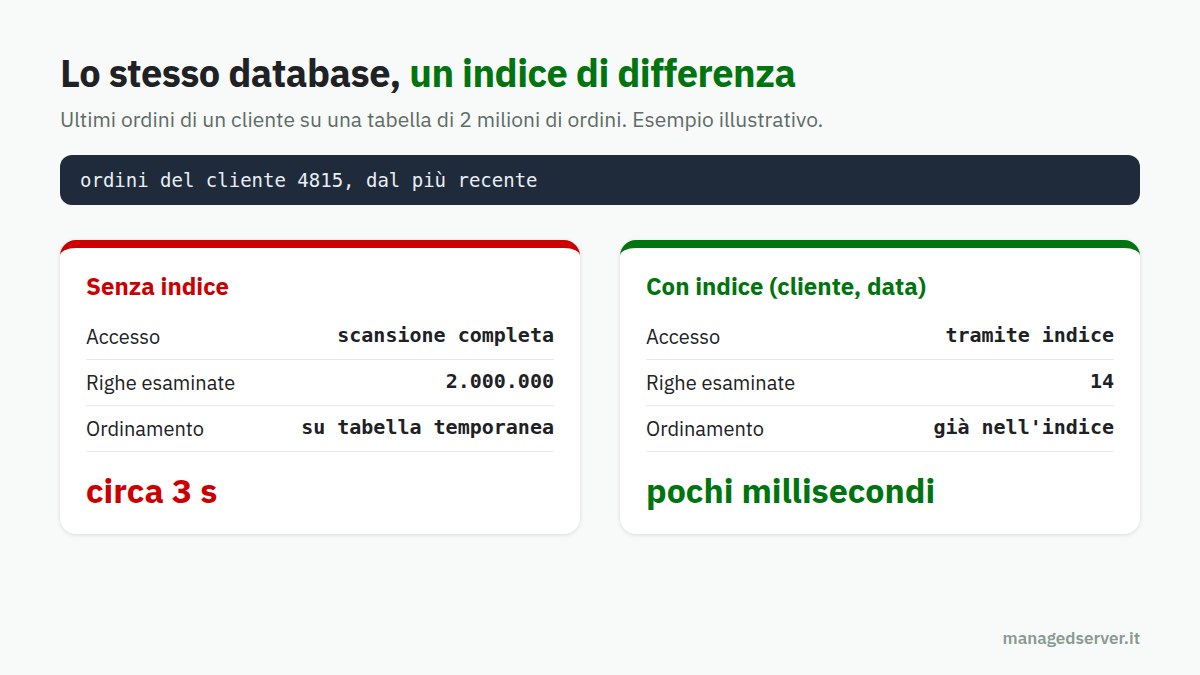
A very common example illustrates what we're talking about. An e-commerce site with two million historical orders displays the user's latest orders on a customer area page. The query searches for orders by customer and sorts them by date. Without a suitable index, the database has no choice: it scrolls through the entire table, two million rows, then sorts the results. On a modern server, this takes a few seconds; with ten concurrent users, the database is saturated.
With a composite index on customer and date, the same query reads only a few rows from that customer, already in the correct order. The time drops to a few milliseconds. No hosting changes, no caching: an operation that takes just a few seconds, performed by someone who knows what they're doing. This is the simplest example, the textbook one; in reality, cases are often more complex, with queries generated by plugins, joins on huge metadata tables, options loaded with each request, but the principle remains the same.
Because the problem gets worse over time
There's one aspect that makes the dust under the rug even more insidious: it grows on its own . A newly published site has few pages, few products, few orders, and small tables. Even a poorly written query on a small table responds quickly. Then months pass. Orders become tens of thousands, plugin logs pile up, content revisions multiply, metadata tables reach millions of rows. The same query, without anyone having touched a single line of code, takes ten or a hundred times longer.
Meanwhile, more plugins are added, each with its own queries for each page, and traffic increases, perhaps thanks to the site's success. The result is a slow and steady degradation, which no one notices until it reaches a certain point: on Black Friday, during a campaign, or after a social media post. At that point, the cache is no longer sufficient, as traffic shifts to the pages it can't cover, and the server crashes when it needs it most.
This is why application optimization isn't a one-time thing, but a habit: measure periodically, monitor table growth, and revise the most expensive queries when data changes significantly.
What we do in Managed Server
In Managed Server, we've chosen not to stop at the server. We naturally optimize the entire stack: web server, PHP-FPM, application caches like Redis, reverse proxies like Varnish, databases, file systems, and networking. But when the bottleneck is in the application, we dive into the application.
Our work follows a precise method:
- measureBefore touching anything, we collect real data. Response times by page type, distinguishing between cached and generated pages, database load, and engaged PHP processes;
- profiling: with APM tools where available, and always with the log of slow PHP requests and that of slow MySQL, MariaDB or PostgreSQL queries, we identify where the time really goes;
- identifying bottlenecks: the query without an index, the plugin that makes dozens of queries, the table grown without control, the synchronous external call, the PHP configuration unsuitable for the load;
- resolution: indexes, query rewriting, database cleanup, custom PHP and database configuration, application caching where appropriate, replacement or fix of the responsible components;
- check: let's remeasure with the same criteria as at the beginning, because optimization without numbers is just an opinion.
Only then, on top of an application that responds reasonably quickly even without a cache, does the web cache become what it should be: an accelerator that brings public pages to a few milliseconds and protects the server during peaks, not a blanket under which to hide four seconds of inefficiency.
It's the same approach we applied to our site, as we described in the story of a true optimization : we start from the numbers, we look for the cause, we intervene on the cause.
A piece of advice for those commissioning a website
If you're about to commission a website or e-commerce site, ask the developer how they'll check server-side performance, not just the PageSpeed score. Ask how long it takes to generate a page without a cache, how many queries the most visited page performs, what happens with ten thousand products instead of one hundred. The answers will tell you much more than a portfolio.
And if your site is already online and slow, be wary of anyone who offers you a more expensive plan or a "smarter" cache as the only solution. Sometimes you really do need more power; much more often, you need someone to lift the rug and look under the hood.
Conclusions
Web caching is one of the most effective tools we have, and we use it on every project we manage. But it's an accelerator, not a cure. A website that takes four seconds to generate a page is still a website that takes four seconds, but the problem manifests itself at the worst times: at checkout, during peak traffic, in the customer area, under the onslaught of bots.
True performance starts with the basics: understanding the cost of operations, designing the database well, using indexes, and measuring before intervening. When these fundamentals are missing in development, you need the skills to make up for them downstream. If your site is slow and no one has yet been able to tell you why, let's talk: with our MySQL and MariaDB consulting , performance optimization , and managed servers, we work across the entire stack, from the database to the application, all the way to the cache.

