

Table of contents of the article:
When it comes to loading a website, speed is of the essence. With modern high-speed internet connections, people generally expect instant results when browsing the web, and if your site loads too slowly then it is likely to close and move on to the next one. We have to solve the problem now, it is a question of business and lost revenue as well as positioning. Speed is no longer an option but a duty of any self-respecting professional site that tends to do well online.
What is mod_pagespeed?
There are a number of aspects that can affect the loading speed of your website, from the performance of your server hardware, to the software you run on it and the code of your website. While most software installs with a configuration designed to get most users up and running, it is sometimes not as efficient as it can be. When using Apache web server or NGINX webserver, its file serving performance can be improved by using the module mod_pagespeed from Google. This module performs some optimizations on the HTML and Javascript code to reduce its size, as well as the caching of modified files to speed up delivery from disk. Pairing with Memcached allows mod_pagespeed to store modified files in memory rather than on disk to further speed up file delivery.

When should I use Mod_PageSpeed?
Mod_PageSpeed is a good option for sites facing the following scenarios:
No history of optimization - Any optimization is better than no optimization. This module contains many of the best practices that your developers can apply right away.
Static sites - If your site is built mostly of static images and content that doesn't change frequently, this module will help you instantly by compressing the images and making your HTML easier to use.
Alongside your Apache or Nginx servers - It is a plugin server for these specific web servers. Great for media companies and other content heavy sites that host and manage their own servers.
No budget for speed - If you have used all your money on a CDN, this module is a good option for front-end optimization as it is open source. However, systems engineers need to install, configure, and update it as your website changes.
But there are no WordPress plugins to increase speed?
If you've just asked yourself this question, know that you're probably right, but from your point of view. In fact, you take for granted that everyone uses CMS such as WordPress, Joomla, Drupal, Magento, where there are already plugins to achieve good performance on the application side. In truth, there are custom sites that have been developed without taking into account an optimization on the application side and as they are not modular, they do not have the possibility to install any plugin or module for performance at the application level.
In these cases either you completely review the code, the javascript and so on, or you rely on mod_pagespeed which will do the optimization for you in an absolutely transparent way without having to put your hand to a single line of code for your application.
Even where you use Plugin for WordPress, maybe you would like to improve the functionality by eliminating some expensive and onerous plugins (from the point of view of server load and PHP speed) to delegate the main optimization functions (JS minification, CSS, HTML, resize images for mobile, Webp transformation, asynchronous loading, above the fold and the like) directly to a native module written in C and therefore extremely performing even for sites with high load (tens of thousands of visits per minute).
For example, you could leave the JS and CSS minification functions delegated to some WordPress plugins such as W3 Total Cache or WP Rocket and enable the serving of webp images (which weigh about 50% less as already written in this article) directly from mod_pagespeed.
Mod_pagesepeed filters, which is what it can do.
A list of available optimizations implemented by Google's PageSpeed Optimization SDK.
PageSpeed modules can automatically optimize web page latency and bandwidth usage by optimizing content to implement web performance best practices.
Reducing the number of requests to a single domain, optimizing cache policies and compressing content can significantly improve web performance and lead to a better user experience.
With PageSpeed's optimization filters it becomes much easier to apply some of these best practices, which provide a solution that efficiently and effortlessly speeds up your web applications. The optimization takes place on the server and works regardless of the framework or language used.
- Add header
- Combine heads
- Inline css @import
- CSS outlines
- JavaScript outlines
- Move CSS above scripts
- Move CSS to head
- Combine CSS
- Minify CSS
- Fallback optimize CSS urls
- Optimize style attributes
- Optimize style attributes with urls
- Flatten CSS imports
- Prioritize critical CSS
- Google Analytics async
- Minify JavaScript
- Rewrite external JavaScript
- Rewrite JavaScript inline
- Includes JS source maps
- Combine javascript
- Canonicalize JS libs
- Inline CSS
- Inline Google Fonts
- Inline javascript
- Local storage cache
- Insert Google Analytics
- Optimize images
- jpeg to progressive
- PNG to JPEG
- JPEG to WEBP
- Convert to lossless WEBP
- Insert image dimensions
- Inline images
- Recompress Images
- Recompress JPEGs
- Recompress PNGs
- Recompress WEBPs
- Convert GIFs to PNG
- Strip color profiles
- Strip image metadata
- Reduce JPEG subsampling
- Resize images
- Resize to dimensions
- Inline preview images
- Resize mobile images
- Remove HTML comments
- Whitespace trim in HTML
- Elide attributes
- Extend cache
- Extend cache for CSS
- Extend cache for images
- Extend cache for scripts
- Extend cache for PDF
- Sprite CSS images
- Rewrite domains
- Trim URLs
- Pedantic
- Remove quotes
- add-instrumentation
- Convert meta tags
- Defer javascript
- Deduplicate images
- Image lazy loading
- Insert DNS prefetch
- IPRO
As you can see, the features are very many and must be enabled based on your theme and site. Not all sites are the same and enabling some incompatible features could "break" the correct functioning of Javascript scripts or CSS elements, producing an incorrect visual effect called pagination or layout pagination.
The ideal philosophy is to enable at least the filters for the images, and gradually enable others as long as you get a good performance result without breaking the correct functioning of the site and the right display.
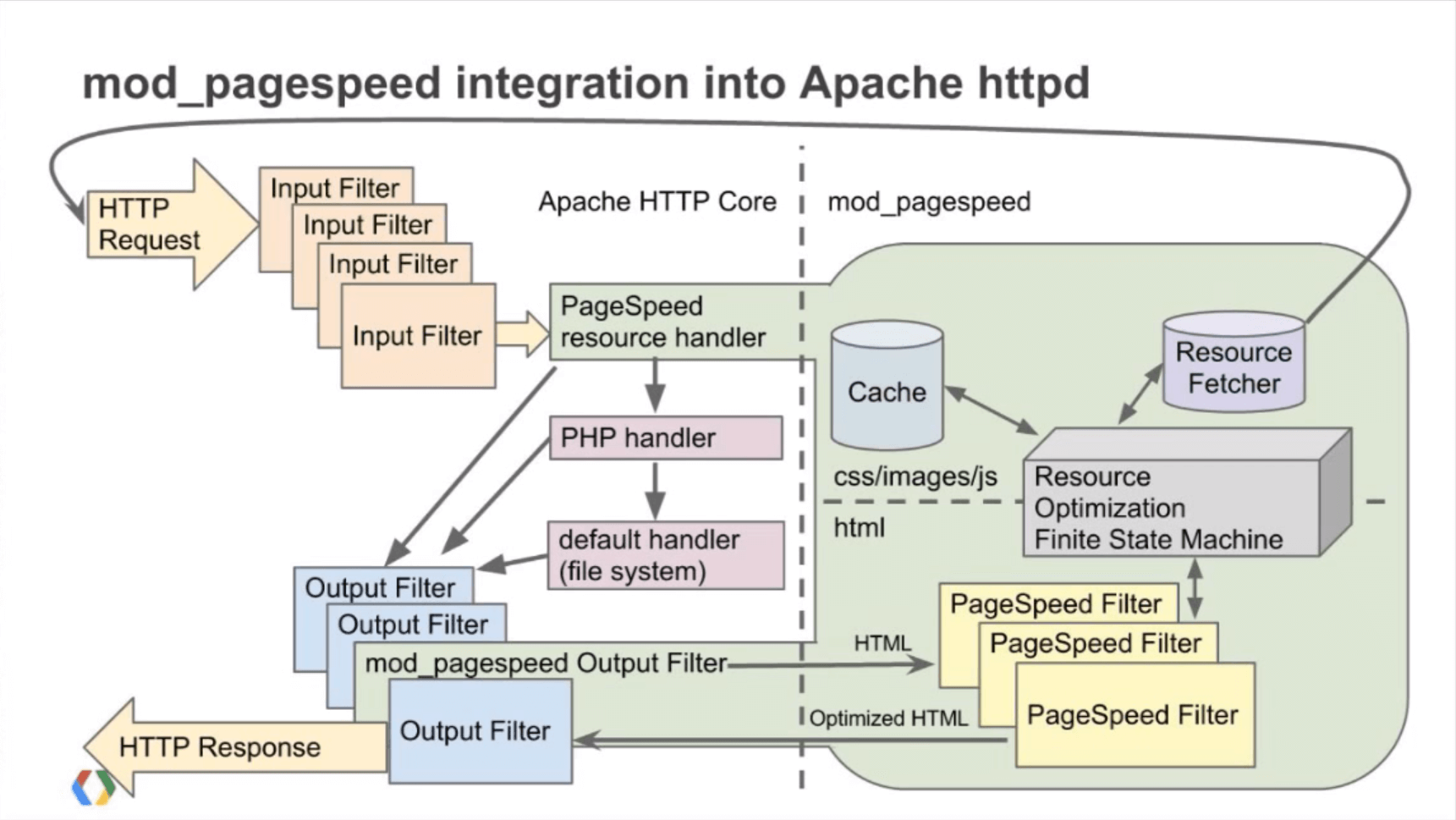
Can I use it on a shared hosting, a VPS or a Dedicated server?
mod_pagespeed or NGX_Pagespeed to work they need to be installed at Apache or NGINX level and therefore the WebServer. It is possible to do this in any context in which the user has access to a Linux instance with root privileges as long as he obviously has excellent system skills since it is an operation performed at the shell level as you see below.
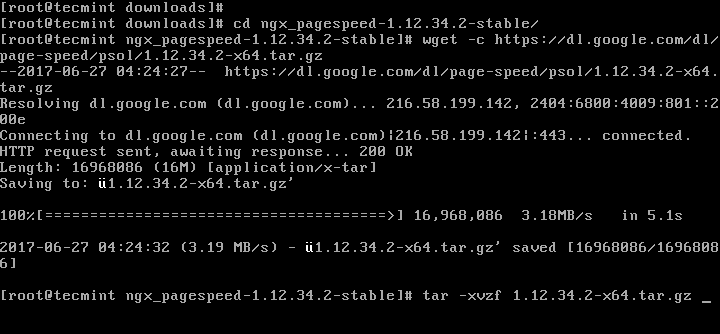
In shared hosting, this function is normally not provided as mod_pagespeed and ngx_pagespeed are rather lacking in resources and enabling them in a shared environment would mean for those companies that sell low cost hosting to see "clog" their machines and not be able to proceed with the barbaric practice of overselling (over-filling a server with many customer sites, in capacity greater than the recommended one) and therefore it is either not enabled or even deliberately disabled.
mod_pagespeed, cPanel and Plesk
Both of the most used hosting control panels in the world provide for the possibility of extending functionality and also the installation of mod_pagespeed as an additional step. The procedure to follow is not so different from what you would do in an environment without a control panel as it must be done from the command line as in the upper screen and in the same way requires root (super user) privileges to be able to download, compile, install and configure the pagespeed module for Apache or NGINX
Considering that at the time by professional systems engineers with over 10 years of experience, our first working installation of ngx_pagespeed (very well calibrated) to solve some small but serious problems of the standard configuration, took about a week, we doubt that an end user a fasting systemistic notions and knowledge of Linux can be able to implement this module alone without risking major damage to the installation or an incorrect configuration of the module that at best can remain inactive, inefficient and at worst break the javascript and the layout of the site.
You can possibly ask your Hosting if it activates and configures mod_pagespeed or ngx_pagespeed on your panel, but don't assume that this can be done easily from your hosting or that it can be done for free, but above all that it can work correctly.
Many of our customers have told us that some hosters have refused the implementation saying that it was not included in their hosting plan and above all that cPanel and Plesk do not have support for pagespeed modules.

Mod_pagespeed and ngx_pagespeed hosting
The best and turnkey solution in which you will not have to think about anything is to rely on a company like ours (not necessarily ours) that gives you a service already included in the high-performance hosting plans and on Dedicated Servers, going to install, configure and calibrate the features of ngx_pagespeed on your site, having the foresight to enable those functions compatible with your site and disable the others that can also seriously harm.
We have the stack ngx_pagespeed moreover it is not only a tangible added value for its own sake, but a component of a rather advanced and very well configured software stack (probably the best on the market) which you can examine in the following graph.

Using our Hosting means not only having the best performance on the market but also the best management of DDOS attacks and optimal management of security, backup and disaster recovery processes, as well as monitoring and constant assistance 24 hours a day, 365 days a year with very fast intervention times.

